
The CRTO
I passed the CRTO exam on 8 October 2025. This is a course review, as well as an opportunity to share some blue-team techniques for detection.
1. Background
Having already obtained the OSEP on 9th July 2025, the Active Directory components of the course were nothing new. The OSEP had been my first contact with the world of pentesting.
Prior to these certs, I had always been more of a reverse-engineer. I am however, always enthusiastic to dive into the different fields of Cybersecurity.
2. Cobalt Strike
The course is an excellent introduction to Cobalt Strike. It covers most of Cobalt Strike’s capabilities, and how absolutely devastating having one of their beacons can be on your machine. The labs and exam are to be completed entirely from a Cobalt Strike beacon.
This is Cobalt Strike’s logo btw…
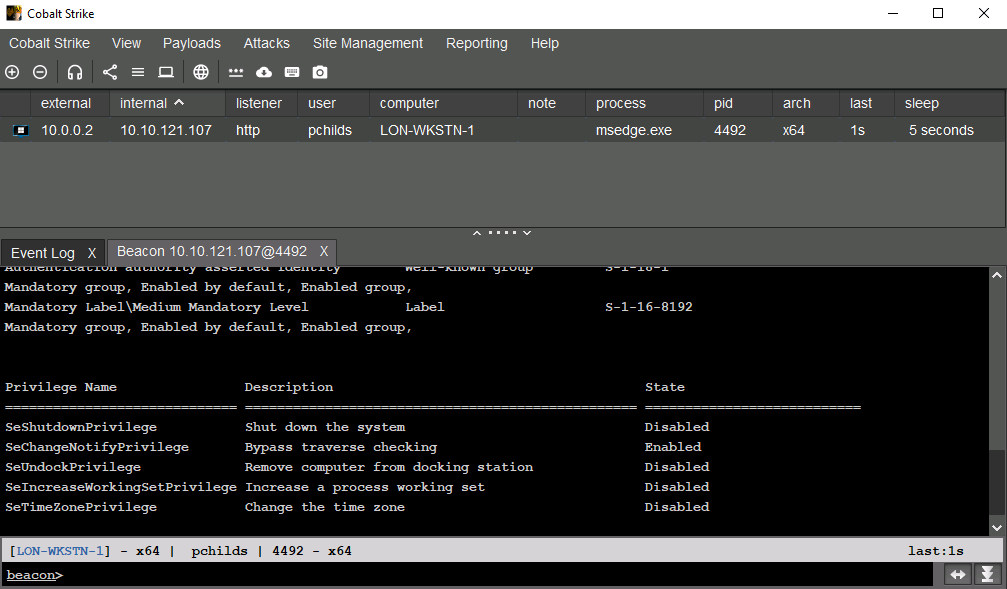
My only complaint is that Cobalt Strike does not have the best UI/UX. I found it rather unintuitive, but it came with practice.
2.1. Evasion
Despite finding the evasion components of the course very basic, I did struggle with it.
Here are some points in the course that the exam really drove home:
- Hardening Cobalt Strike against Windows Defender (or other security products on the target system).
- Knowing where is least suspicious to inject your beacon/fork-and-runs.
- Never EVER touching lsass.exe. This creates Sysmon
ProcessAccess(EventCode=10) events with privilegedAccessGrantedvalues.
This command is a shorthand for mimikatz sekurlsa::pth and injects the credentials into LSASS memory. It opens a privileged handle to LSASS, is detectable, and shouldn’t be used unless you’re aware of your target’s capabilities.
beacon> pth LON-DC-1\Administrator 529ca8050a00180790cf88b63468826a
2.2. Pivoting
The one thing I LOVE about Cobalt Strike is the ability to be many beacons deep into a network, while experiencing seamless command execution on any machine in the chain.
The below image (names redacted) demonstrates the depth of the beacon chains possible. The beacons connect over SMB named pipes, and only the original beacon reaches the attacker C2 infrastructure.

2.3. A Blue Team Perspective
Although not part of course content, through Sysmon logs and Splunk/Elastic, I’ve learnt how to hunt for fork-and-run (with ppid spoofing) activity from a suspected beacon, and uncover the attacker’s named pipe formats.
An opportunity to detect fork-and-run activity when execute-assembly is used, is by monitoring for Sysmon ImageLoad (EventCode=7) events of non-dotnet processes loading clr.dll. It is possible to load DLLs without raising ImageLoad events (Cobalt Strike does not do this by defualt). This may be accomplished by reading a DLL from file and mapping it’s sections manually in memory, avoiding the use of WinAPIs like LoadLibraryA.
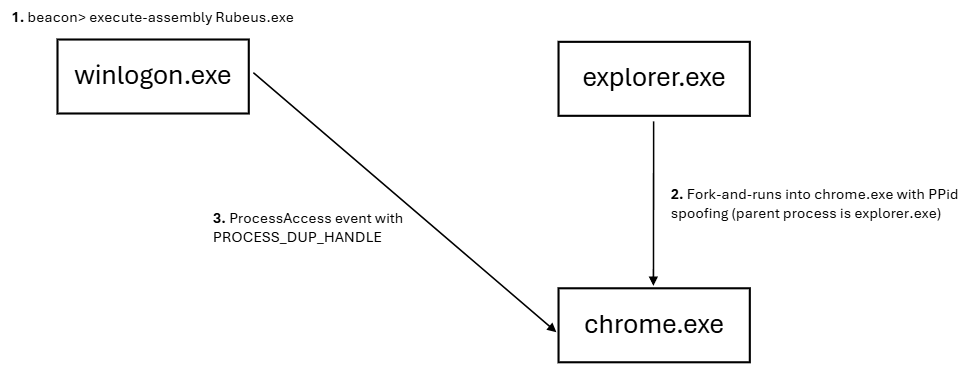
When fork-and-run is used with PPid spoofing, the beacon process may be difficult to identify. Look for Sysmon ProcessAccess (EventCode=10) with PROCESS_DUP_HANDLE (AccessGranted=0x40) - the beacon should directly access the target/sacrificial process. Then, correlate the timings of such ProcessAccess events with ProcessCreate (EventCode=1, if fork-and-run spawns a new process) or Pipe Created (EventCode=17, I/O with the target process) events.
Lastly, Attacker named pipe formats can be identified with Pipe Created (EventCode=17) and Pipe Connected (EventCode=18) events, especially when correlated with timings of identified fork-and-run events.
In the below illustration, the attacker beacon is hiding in winlogon.exe, and fork-and-runs into chrome.exe.
3. The Exam
The CRTO exam is 48 hour long, but can be paused and spread over 7 days. This was a great addition, since I had to juggle work and study.
I passed on my 3rd exam run. Here are the outlines of my runs:
- Booted into the exam to test payloads and techniques (because lab times are too short). During this, Windows Defender flagged at least 20 times. That’s when realization hit that I was wayyyy underprepared.
- Achieved the operational objectives, but failed due to OPSEC. I learnt a bunch from this second attempt, and how important it is to really understand the effects your tools of choice on the system (looking at you
mimikatz pth). Remember to configure Cobalt Strike’s malleable C2 to remove its default indicators. - Replicated the steps in the previous attempt, but with better OPSEC. Passed the exam with 99/100 points.
4. The Pros & Cons
Overall, this course is great knowledge for both attackers and defenders. There are few other opportunities to practice Cobalt Strike.
4.1. Pros
- Great content for a reasonable price
- In-browser labs and exam - study anywhere.
- Infinite exam retakes and duration (48 hours over 7 days).
4.2. Cons
- Limited lab time (30 minutes to an hour) - I often find myself racing against the lab’s expiry.
- Could go deeper into Active Directory attacks (ADCS, relaying) and their OPSEC considerations.
- Inability to transfer tools in and out of the lab/exam environment - no custom loaders (though you shouldn’t need any).
5. Cat
Meow.